Convert a bank statement PDF to Excel or CSV
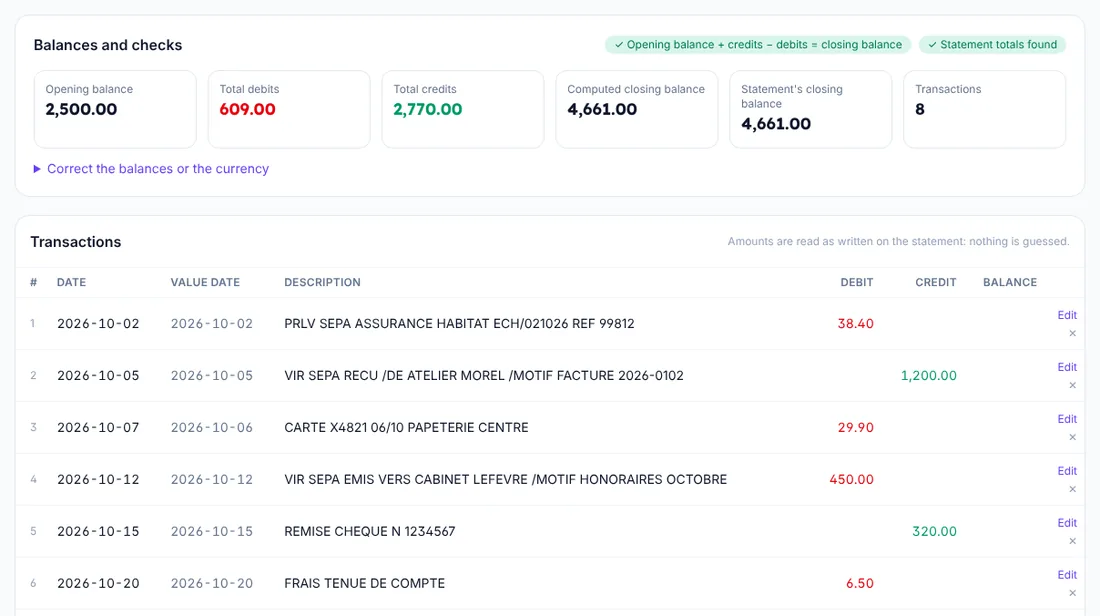
Import your PDF bank statements: each transaction is read with its date, description, debit or credit and balance. The statement balances are checked, then you download a ready-to-use Excel or CSV file — without retyping anything.
✓ 10 statements a month, free to start · no credit card
How it works
-
1
Import your statements
One or more PDF statements, several pages long, as your online bank provides them.
-
2
The transactions are read
Date, value date, description, debit, credit and balance: each amount's side comes from its column on the statement.
-
3
The balances are checked
Opening balance + credits − debits must give the closing balance. A consistent statement is validated; otherwise it stays to be checked.
-
4
Download the result
A clean Excel or CSV file, or straight into Rapprocha's bank reconciliation.
Why use Rapprocha
- No more retyping: dozens of transactions converted in seconds.
- Debits and credits never mixed up: each amount is read from its column, or from the movement of the balance.
- Automatic checks: balances, printed totals and the running balance.
- Nothing is invented: an unreadable date or amount is flagged, never filled in by guesswork.
- Your statements stay with us: read by our own servers in Europe, without AI or any third-party service, deleted automatically.
Who is it for?
Freelancers, small businesses, accountants and administrative assistants who receive PDF statements and must use them in a spreadsheet, accounting software or a reconciliation.
 Try for free
Frequently asked questions
How do I convert a bank statement PDF to Excel?
Import the PDF into Rapprocha: the transactions are read and shown as a table (date, description, debit, credit, balance). Check the balance checks, correct a row if needed, then click "Excel (XLSX)" or "CSV".
Is it free?
Yes to start: the free plan includes 10 statements every month, no credit card. Paid plans raise this quota.
Are scanned statements supported?
No: there is no character recognition. A scanned statement (an image) is flagged and not charged. Download the PDF statement from your online banking instead: it contains text.
Which banks are supported?
Reading does not depend on a template per bank: it finds the Date, Description, Debit, Credit, Amount and Balance columns, in French or English. If a layout is not recognised, the statement is flagged and you are not charged.
Is my bank data safe?
Statements are read by our own servers, hosted in the European Union, without being sent to any third-party AI service. Each account is isolated, and PDFs are deleted automatically 7 days after last use.
The other Rapprocha tools
Practical guides
Convert a bank statement PDF to Excel or CSV
10 statements a month, free to start · nothing to install
Convert my statements