Convert PDF invoices to Excel or CSV
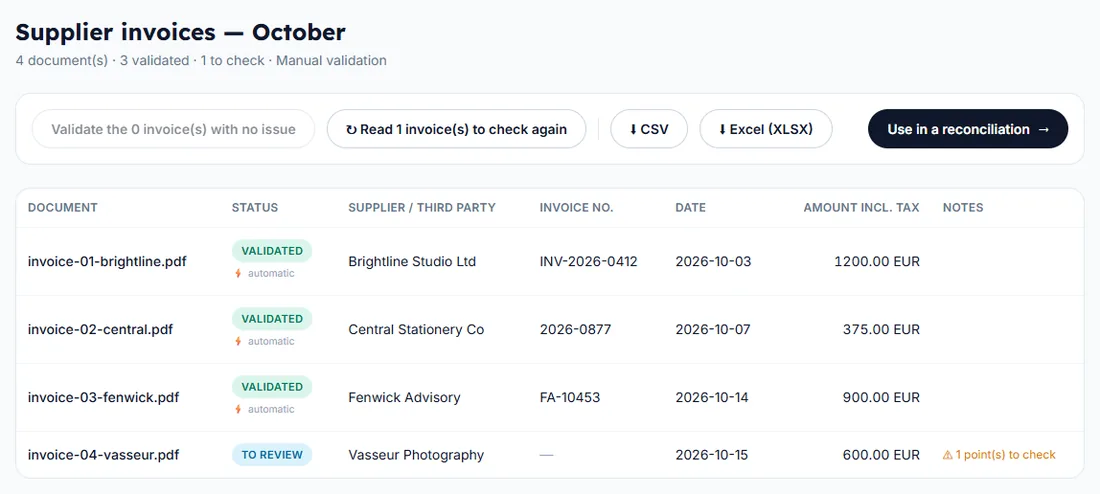
Drop your PDF supplier invoices: the supplier, number, dates and amounts are read and put into a table. You check what is uncertain, then export an Excel or CSV file — without retyping a single invoice.
✓ 100 PDFs per month, free to start · no credit card
How it works
-
1
Drop your invoices
Several PDFs at once, in French or English.
-
2
The data is read
Supplier, number, date, due date, net, VAT, total and currency, each with its level of certainty.
-
3
Check what is uncertain
An ambiguous value is flagged with its candidates; a clear invoice can be validated automatically.
-
4
Export
As Excel or CSV, or straight into a bank reconciliation.
Why use Rapprocha
- Hours of data entry saved every month.
- Each value shows where it comes from: extracted, uncertain or corrected by you.
- Nothing is invented: a value that cannot be found stays empty.
- Net + VAT = total check and duplicate detection.
- Read on our servers in Europe, without third-party AI; PDFs deleted automatically.
Who is it for?
Freelancers, small businesses and accounting firms who receive PDF supplier invoices and must enter or reconcile them.
 Try for free
Frequently asked questions
How do I extract data from a PDF invoice to Excel?
Drop your invoices into Rapprocha: each invoice is read and its details put into a table. Check the flagged values, validate, then download the Excel or CSV file.
Is it free?
Yes to start: the free plan includes 100 PDF invoices every month, no credit card.
Are scanned invoices read?
No: there is no character recognition. A scanned invoice is not read and not charged; you can type its values yourself.
What happens if a value is ambiguous?
It is never chosen for you: the field stays empty and the possible values are offered. You pick one in a click.
The other Rapprocha tools
- PDF to CSV — Bank statementsPDF bank statement to Excel and CSV converter
- Bank reconciliation
- Excel & CSV cleaner
- Data reconciliation
- Data Quality Checker
Practical guides
- Converting PDF invoices to CSV or Excel: a step-by-step method
- Digital or scanned PDF invoice: will it be read?
- From a PDF invoice to bank reconciliation: the full path
Convert PDF invoices to Excel or CSV
100 PDFs per month, free to start · nothing to install
Extract my invoices