Check the quality of an Excel or CSV file
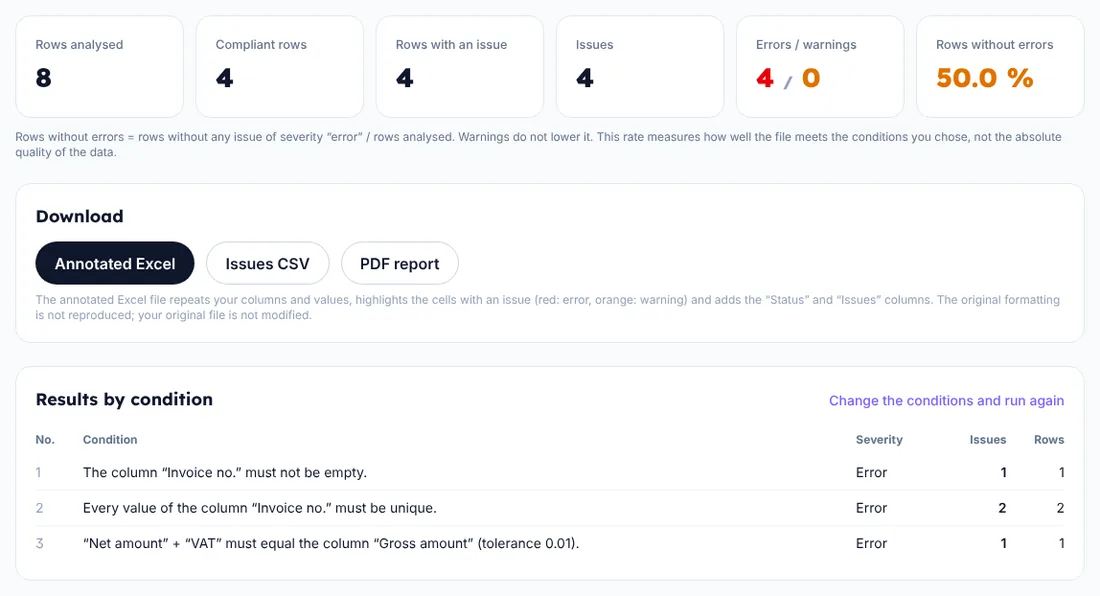
Define what is correct for your data, check the file in one go and find every issue, with its row, its column and the condition it breaks. Download an annotated Excel file, a CSV of issues or a PDF report.
✓ 10 checks per month, free to get started · no credit card
How it works
-
1
Import your file
Excel (.xlsx), CSV, TSV or text.
-
2
Define your conditions
Required value, uniqueness, format, range, list of values, calculation across columns…
-
3
Run the check
Each issue is tied to its row and its condition, as an error or a warning.
-
4
Export
Annotated Excel, CSV of issues or PDF report; your conditions are kept for next time.
Why use Rapprocha
- Files checked before import, payroll, invoicing or reporting.
- Your rules, applied to every row, without writing a formula.
- Your file is never changed.
- Conditions saved and reusable every month.
Who is it for?
Financial controllers, accountants and teams who receive files to check before using them.
 Try for free
Frequently asked questions
How do I check an Excel file for errors?
Import the file, add your conditions (required field, duplicate, format…) and run the check: each issue is listed with its row, then highlighted in the annotated Excel file.
Is it free?
Yes to start: the free plan includes 10 checked files every month, no credit card.
Is the file corrected automatically?
No: nothing is changed in your file. You see the issues and you decide.
The other Rapprocha tools
- PDF to CSV — Invoices
- PDF to CSV — Bank statementsPDF bank statement to Excel and CSV converter
- Bank reconciliation
- Excel & CSV cleaner
- Data reconciliation
Check the quality of an Excel or CSV file
10 checks per month, free to get started · nothing to install
Check a file